
 today deals
 special offer



Apple’s recent annual launch event was seriously packed with genuinely innovative new products – hello iPhone Duo – brand new features and welcome tweaks to existing set-ups.
Among those launches is Apple’s Audio Intelligence toolkit, which will be found within the Apple Watch Series 12 and Apple Watch Ultra 4. While some features within the toolkit are useful, there are a couple that, to me, have clear privacy issues.
What is Audio Intelligence?
Audio Intelligence uses Apple Watch Series 12 and Ultra 4’s built-in microphones to enable the following tools: Sound Recognition, Music Recognition, Live Rewind and Siri Recap.
I should start by saying there are aspects of Audio Intelligence that should genuinely come in handy. Sound Recognition, for example, will be useful for those who are deaf or hard of hearing, as it’ll detect sounds like sirens, alarms and even a crying baby and notify users accordingly.
In a similar vein, Music Recognition is a welcome addition to Apple Watch as it will automatically detect songs playing in the background, without you needing to tap the widget. As someone who constantly uses Shazam to identify songs, this is a useful feature that I’ll definitely benefit from.

My issues, therefore, lie with Live Rewind and Siri Recap.
Live Rewind and Siri Recap
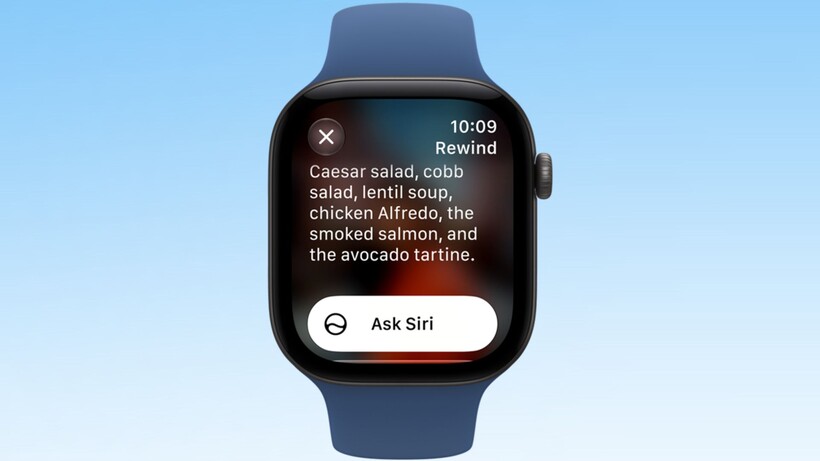
When you double-press the Apple Watch’s Digital Crown, Live Rewind will show you a text snippet of what was said in the past 15 seconds, so you can catch something you missed. So instead of simply saying “sorry, could you repeat that”, Apple is giving you the option to check your Watch.
Don’t get me wrong, I completely understand the awkwardness of having to get someone to repeat something more than once. It can be pretty embarrassing, especially when you have to ask them twice or even three times. However, it’s human and something I’m sure everyone has had to do, whereas with Live Rewind, Apple is encouraging you not to interact with others and instead to look away from them and down at your wrist.

But that’s not even the worst of the lot. Siri Recap will “take notes” of your conversations throughout the day and create Apple Intelligence-generated summaries for you to look through later that day or for up to seven days after, before they’re automatically deleted (unless you choose to save them, that is).
The summary isn’t a transcript, according to Apple. Instead, it’s “brief” and “high-level” and comparable to notes you might jot down after a conversation. The difference here is, personally, I don’t tend to jot notes after chatting with my friends at the pub.
The issue with Siri Recap
As if we didn’t have enough to worry about, with the rise of smart glasses being used to film people without their permission or even their knowledge at the best of times – something I discussed after Kylie Jenner unveiled her own range of Meta glasses – now we have to worry about our conversations being recorded.
Yes, this feature has the potential to come in handy as Apple’s examples suggest. Perhaps your training plan from a PT can be condensed into an easy-to-read note, or a meeting can be summarised – but I’d argue that there are already dedicated tools for this. A PT can give you a copy of your workout plan if you just ask, and most of us naturally write notes during important meetings too. Didn’t quite catch something, or you’ve seen a gap in your notes after the meeting? Just ask your colleague if they caught it.

I’m also remembering times when I’ve shared everything from private worries to light-hearted but fairly embarrassing stories with loved ones. There’s a difference between simply sharing those stories in the moment and having people able to literally store snippets on their Apple Watch.
Plus, as the feature is yet to be released, we don’t know how far-reaching Siri Recap can be. Will it pick up random conversations between colleagues that don’t directly involve you, but you’re just close enough? Could it even pick up strangers’ conversations on the train?
For me, Live Rewind and especially Siri Recap are simply an invasion of privacy that’s being oddly marketed as a useful tool for the Apple Watch wearer.
But even then, I would argue they’re not even that useful for most people either, and they actively discourage social interaction. After all, why would you politely ask someone to repeat themselves or call a friend to ask them the name of the restaurant they raved about earlier, when you can just check your Apple Watch?
What has Apple said about Audio Intelligence?
Apple has a whole page of information about how data is saved on Audio Intelligence.
Audio is not recorded or stored, which means you can’t forward or share it with others, and raw audio is never accessible either. There’s also end-to-end encryption at play and, as mentioned earlier, Siri Recaps will automatically delete after seven days if left unsaved, and Live Rewind snippets will “disappear permanently” 30 seconds after the Apple Watch’s display dims, unless saved.
Apple also claims that it will play an audible chime from the Apple Watch’s speaker and reveal a full-display animation and microphone indicator when Live Rewind has been activated, to alert those nearby of the feature. In addition, Siri Recap is promised to “omit potentially harmful content”, sensitive information and certain personal identifiers too.
However, under “How Audio Intelligence features protect the privacy of those nearby”, the final point simply tells Apple Watch wearers to “be mindful of those around you” and “consider those around you where conversations might be private or sensitive”. That means even with the privacy features Apple is promising, the onus is still put onto the Apple Watch wearer.
Given the fact that some smart glasses wearers happily film strangers without their consent, I don’t feel comfortable giving Apple Watch users the ultimate say on whether they deem my conversation private or sensitive.
Essentially, I think Sound Recognition and Music Recognition would have been enough for Audio Intelligence. The inclusion of Live Rewind and Siri Recap frankly feels creepy and unnecessary. It will be interesting to see how the features work in real-world use once the Apple Watch Series 12 and Ultra 4 are readily available.




Leave a Reply